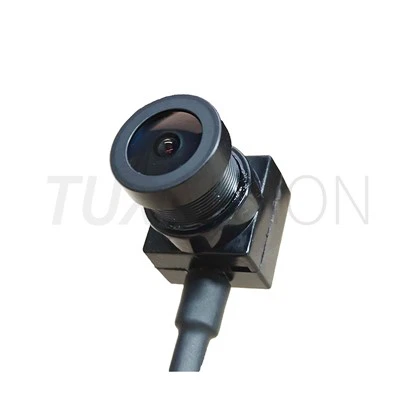
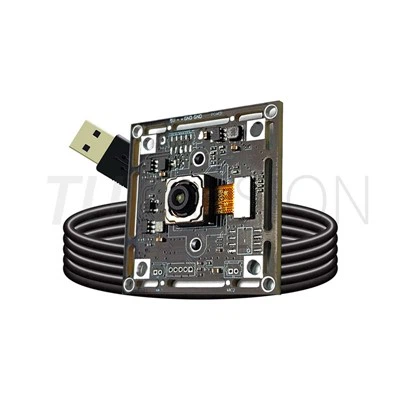
Selecting a USB camera module for machine vision involves more than just picking the greatest resolution. The camera must cooperate with the lens, lighting, working distance, object speed, processing hardware, and mechanical structure of a real inspection system. For one application, a 2MP camera module might be the best option, but another system would need 5MP, 8MP, or 4K imaging. Aligning the image configuration with the inspection requirement is crucial.
Megapixels alone do not determine image clarity for machine vision systems; rather, the entire optical and electrical system does. The final outcome is influenced by a number of factors, including sensor type, shutter technology, frame rate, lens quality, field of vision, exposure control, and USB bandwidth.

What Makes a USB Camera Suitable for Machine Vision?
The function of a machine vision camera differs from that of a traditional webcam. It must supply consistent and reliable image data for inspection algorithms, measurement, recognition, or process control rather of focusing primarily on creating esthetically beautiful video.Systems for industrial inspection frequently run nonstop. As a result, the camera requires steady frame transmission, constant exposure, and predictable image output. Depending on the needed resolution, frame rate, and system bandwidth, USB interfaces including USB 2.0, USB 3.0, and USB 3.1 offer several alternatives.The amount of spatial information that the sensor can record depends on its resolution, yet higher resolution isn't necessarily preferable. For larger components, location, presence detection, barcode reading, and general inspection, a 2MP camera module with 1920 x 1080 resolution may be adequate.Higher-resolution camera modules become useful when the inspection target contains smaller defects, fine surface details, or measurement features that cannot be separated clearly at 1080p.

Global Shutter vs. Rolling Shutter
Shutter type should be considered according to object movement. A rolling-shutter sensor exposes different image rows at slightly different times. This can work well for relatively static inspection tasks, but fast-moving objects may show geometric distortion.
A global shutter camera module exposes the image at the same time across the frame. For moving components, conveyor inspection, robotic vision, and high-speed measurement, global shutter can therefore be a better starting point.
When Is 2MP Enough?
If the inspection target is relatively large and the system mainly needs to identify presence, position, orientation, or obvious defects, 2MP may provide a good balance between image detail, processing load, and data bandwidth.
When Should You Move to Higher Resolution?
Consider 5MP, 8MP, or 4K imaging when the target contains small defects or when the camera needs to cover a larger area while maintaining sufficient pixels on the inspection feature. However, the lens and working distance should be evaluated at the same time.
Lens Selection Is Just as Important as the Sensor
A high-resolution sensor cannot compensate for an unsuitable lens. The lens determines how the sensor sees the inspection area, including field of view, working distance, distortion, aperture, and image sharpness.
Working Distance and Field of View:Before selecting a lens, define the distance between the camera and the target and determine how much of the target must appear in one frame. A lens with the wrong focal length may either leave part of the inspection area outside the image or provide too much unused background.
Image Clarity at the Edge of the Frame:For machine vision, image clarity should be checked across the useful inspection area rather than only at the center of the image. Lens quality, distortion, aperture, sensor size, and optical alignment all influence the usable image area.
For OEM projects, the USB camera module for machine vision can be configured around the required sensor, lens, FOV, and mechanical structure rather than forcing the equipment to fit a standard camera.
Machine Vision Camera Selection: An Engineering Approach
A practical camera selection process starts with the inspection target and works backward toward the camera specification.
Step 1: Define the Inspection Target
Determine what the vision system actually needs to detect or measure. This could be a missing component, surface defect, dimension, position, barcode, printed character, or assembly error.
Step 2: Estimate the Required Resolution
Estimate how many pixels are needed across the smallest feature that the algorithm must recognize. This gives a more useful basis for choosing between 2MP, 5MP, 8MP, and higher-resolution camera modules.
Step 3: Check Object Movement
For stationary or slow-moving targets, rolling shutter may be adequate. For fast conveyor systems, robotic movement, or high-speed inspection, evaluate a global shutter sensor and the required frame rate.
Step 4: Match the Lens to the Working Distance
Select the focal length and FOV according to the target size, camera-to-object distance, and available installation space. The sensor and lens should be evaluated as one optical system.
Step 5: Check Interface and Processing Load
The required resolution and frame rate affect data bandwidth and processing requirements. USB 2.0 can be practical for lower-bandwidth applications, while USB 3.0 or USB 3.1 can provide more headroom for higher-speed image transmission.

Where Are USB Camera Modules Used in Machine Vision?
USB camera modules are commonly considered for embedded and industrial vision equipment where compact dimensions and straightforward host integration are important.
- Automated visual inspection
- Defect detection
- Dimension and position measurement
- Barcode and OCR systems
- Robotic vision
- AGV navigation and object detection
- Embedded AI vision
- Production-line quality control
Why Customization Matters for OEM Machine Vision
Standard camera modules are useful for evaluation, but production equipment often has fixed mechanical and optical constraints. The PCB may need to fit a narrow enclosure, the cable may need a specific length, or the lens may need a particular FOV.
For OEM and ODM projects, customization can include the sensor, lens, FOV, PCB layout, cable length, connector, housing, and IR filter. This allows the camera module to be developed around the equipment instead of redesigning the equipment around a standard camera.
You can also review the wider USB camera module product range when comparing resolution, sensor, interface, and form-factor options.
USB Camera Module for Machine Vision: Key Selection Checklist
Before requesting a sample or quotation, it is useful to prepare the following information:
- Target resolution or smallest inspection feature
- Object movement speed
- Working distance
- Required field of view
- Lighting conditions
- Required frame rate
- USB interface and host platform
- Available installation dimensions
- Lens and IR-filter requirements
- Prototype and production quantity
With these parameters defined, the camera selection becomes much more straightforward. Instead of starting with "Which camera has the highest resolution?", the better question is "What image does the vision algorithm actually need?"
Conclusion
When the sensor, shutter, lens, illumination, interface, and mechanical structure are all matched to the inspection task, a dependable machine vision camera is produced. A small 2MP camera module is sufficient for many systems. Others might require specialized optics, a global shutter, a faster frame rate, or a higher resolution.
The most sensible strategy is to assess the entire image chain before choosing the USB camera module based on those specifications. This lowers the possibility of image-quality issues during system integration and helps prevent paying for needless resolution.