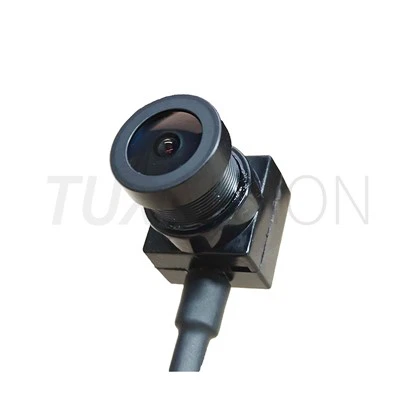
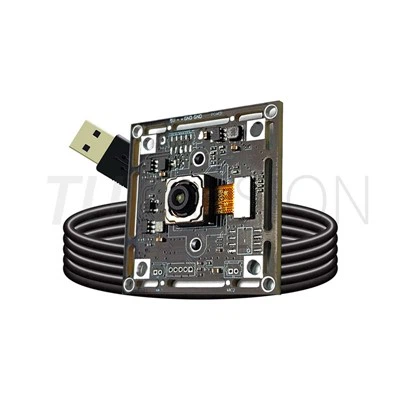
A USB Camera Module for QR Code Scanner is more than just a tiny camera attached to a scanning apparatus. For the decoding software to reliably read QR codes and barcodes, the camera must record sufficient detail, maintain consistent image quality, and offer an appropriate field of view. A well-matched 2MP camera module in many embedded scanners can already offer adequate image clarity for typical QR code applications without needlessly raising system costs or processing demands.
"What camera configuration gives the decoder a reliable image under the actual scanning conditions?" is a more crucial question for equipment manufacturers than "How many megapixels do we need?"
Why Camera Selection Matters in QR Code Scanning
The quality of the image sent to the decoding algorithm determines how well a QR code can be read. Even a powerful decoding algorithm could have trouble if the code takes up too few pixels, the image is fuzzy, or the exposure varies greatly between scans.For this reason, the entire optical system should be considered while evaluating a camera module for QR code scanning. The final scanning output is influenced by a number of factors, including sensor resolution, lens choice, field of view, working distance, focus technique, illumination, and USB interface.
What Should You Look for in a QR Code Scanner Camera Module?
1. Resolution: Is 2MP Enough?
For many QR code scanners, 2MP is a practical starting point. A 1920×1080 image provides enough pixels for common QR codes, product labels, tickets, packages and identification tags when the optical configuration and working distance are properly matched.
A higher-resolution sensor is not automatically better. If the QR code is already large enough in the image, moving from 2MP to 5MP or 8MP may add processing requirements without producing a meaningful improvement in decoding reliability.
For compact scanners, self-service terminals and embedded barcode readers, a well-tuned 2MP camera module can therefore offer a good balance between image clarity, processing load, module size and cost.

2. Image Clarity and Lens Matching
Image clarity is determined by more than the sensor specification. The lens needs to resolve the details captured by the sensor, while the field of view should match the expected scanning distance and target size.
For example, a wide-angle lens may cover a larger scanning area, but the QR code will occupy fewer pixels at the same distance. A narrower field of view can provide more pixels on the code, but may require more accurate positioning.
This is why lens focal length, FOV and working distance should be considered together instead of selecting a lens only by megapixel count.
3. Fixed Focus or Auto Focus?
The focus method depends heavily on how the scanner is used. If the QR code is always presented within a controlled distance, a fixed-focus camera can be simpler, faster and more predictable.
If the scanning distance changes significantly, autofocus can provide more flexibility. However, autofocus also introduces additional mechanical and control considerations, so it is not necessary for every QR code scanner.
4. Frame Rate and USB Interface
For applications where objects move through the scanning area, frame rate becomes more important. A stable 30fps camera can be sufficient for many static or moderate-speed scanning applications, while higher frame rates may be useful for moving products or conveyor-based systems.
The USB interface should also match the system architecture. USB 2.0 is often sufficient for standard Full HD imaging, while USB 3.0 becomes more useful when higher resolution, higher frame rate or multiple camera streams are required.
QR Code Scanner Camera Selection: An Engineering Approach
Instead of starting with the highest available resolution, it is usually more efficient to work backward from the scanning requirement.
Step 1: Define the QR Code Size
First determine the smallest QR code that the scanner needs to recognize. A small code printed on a label requires a different optical configuration from a large QR code displayed on a screen.
Step 2: Define the Working Distance
Measure the expected distance between the camera and the code. This value is directly related to lens selection and field of view.
Step 3: Calculate the Required Image Coverage
The camera should provide enough pixels on the smallest QR code while still covering the required scanning area. This is where resolution and lens FOV need to be evaluated together.
Step 4: Check Lighting Conditions
A scanner used indoors under controlled lighting has different requirements from a scanner exposed to sunlight, reflective packaging or uneven illumination. Exposure control, white balance and optical filtering may need to be adjusted accordingly.
Step 5: Test the Complete Camera Configuration
The final evaluation should be based on actual scanning performance rather than the camera datasheet alone. Testing the sensor, lens, image settings and decoding software together can reveal problems that are not obvious from individual component specifications.
Recommended Camera Configuration for Embedded QR Scanners
For a typical embedded QR code scanner, a 2MP USB camera module with Full HD output can be a practical configuration when the scanning distance and code size are controlled. A compact PCB, suitable lens, stable USB connection and consistent image output can make integration easier for OEM equipment manufacturers.
For example, the 2MP USB Camera Module from TUXIVISION uses a 1/2.9-inch CMOS sensor and supports 1920×1080@30fps. Its compact design is intended for applications such as barcode scanners, embedded vision devices, industrial equipment and self-service terminals.
If the project requires a different sensor, lens, FOV, PCB size, cable or connector, a custom camera module can be evaluated around the actual mechanical and optical requirements.

Where Can QR Code Camera Modules Be Used?
A QR code scanner camera module can be integrated into many types of equipment, including:
- Self-service kiosks and payment terminals
- Parcel and logistics scanning equipment
- Retail checkout and product identification systems
- Industrial traceability systems
- Access control and ticket verification equipment
- AGV and warehouse automation systems
- Embedded barcode and QR code readers
Custom USB Camera Modules for QR Code Scanner Projects
Different scanning systems often require different camera configurations. The module may need a specific PCB shape, lens FOV, cable length, connector position, sensor, IR filter or housing dimension to fit the final device.
TUXIVISION provides USB camera module customization covering sensor selection, lens configuration, FOV, PCB layout, cable, connector, housing and image tuning. For OEM and ODM projects, the camera can be evaluated according to the actual scanning distance, target size and mechanical structure rather than using a fixed configuration for every application.
Final Selection Checklist
Before selecting a camera module for a QR code scanner, confirm these points:
- Smallest QR code size
- Minimum and maximum working distance
- Required field of view
- Required image resolution
- Fixed focus or autofocus requirement
- Lighting and reflection conditions
- Required frame rate
- USB 2.0 or USB 3.0 interface
- Available installation space
- Decoding software and host platform compatibility
-
Therefore, the camera with the best resolution isn't always the best QR code scanner. A more dependable scanning system typically results from a well-balanced combination of sensor, optics, image quality, operating distance, lighting, and interface.Get in touch with TUXIVISION with your desired QR code size, working distance, and installation dimensions whether you are creating a barcode reader, embedded identification device, or QR code scanner. After that, the camera setup can be assessed based on the real needs of the application.